The Portable Document Format (PDF) was engineered by Adobe in 1993 with a specific goal: ensure that digital documents render identically across any computer monitor or physical printer. However, that static reliability makes PDFs famously difficult to edit.
When users need to fix a typo, fill out an employment form, sign an NDA, or block out a Social Security Number, they often turn to free online PDF websites. Unfortunately, most free web tools require uploading your confidential files to remote cloud servers—a massive security and privacy gamble.
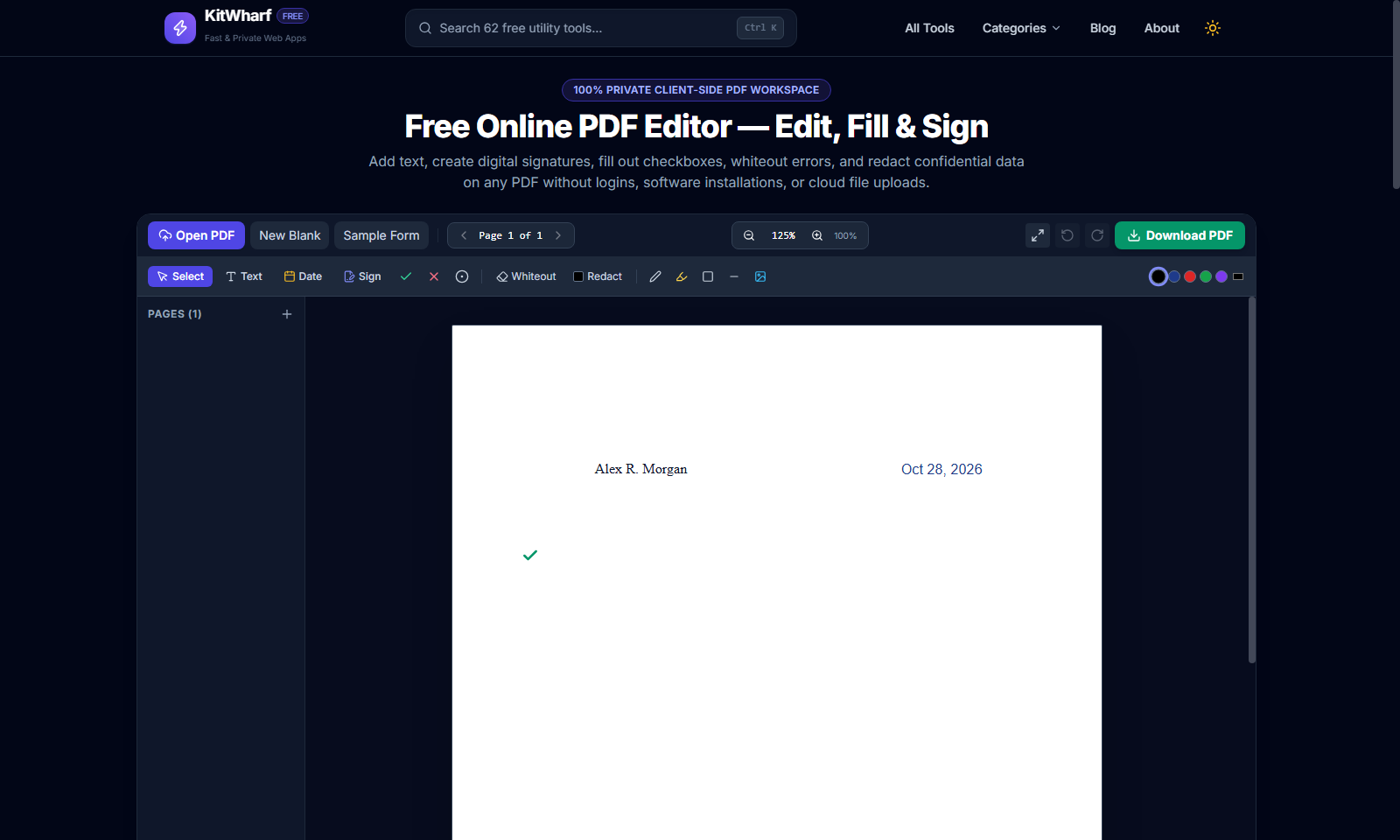
In this guide, you will learn how modern in-browser PDF editing works, why local client-side processing protects your data, and how to edit, sign, and redact PDFs effortlessly with KitWharf Free PDF Editor.
The Hidden Danger of Cloud-Based PDF Editors
When you upload a PDF to traditional online editors, your document is sent across the internet and stored on third-party servers (frequently in unencrypted staging directories). If the file contains:
- Tax forms (W-2, 1040, 1099) with full Social Security Numbers (SSNs) and earnings
- Legal agreements & NDAs with proprietary trade secrets and client names
- Medical records & insurance claims governed by HIPAA
- Bank statements & credit card applications
...you have inadvertently created a data breach liability. Many websites retain uploaded files for hours or days, exposing your sensitive information to potential server compromises or advertising trackers.
The In-Browser Alternative (Client-Side WebAssembly & Canvas)
KitWharf Free PDF Editor uses a zero-upload architecture. When you open a PDF, it is parsed directly inside your device's memory using HTML5 Canvas and WebAssembly. No bytes are ever transmitted over the network. When you export, the edited vector PDF is generated locally on your processor.
4 Common PDF Tasks (And How to Do Them in Seconds)
1. Adding & Editing Text on Existing Documents
Whether correcting an outdated address or adding missing invoice numbers:
- Open KitWharf Free PDF Editor and choose your document.
- Click the Text tool in the toolbar.
- Click anywhere on the document where you want text placed.
- Type your text, select your font (Helvetica, Times Roman, or Courier), and adjust font size or color.
- Switch to Select mode to drag your text into exact alignment with existing lines.
2. Filling Form Checkboxes (✓ / ✕ / •)
Traditional PDF software makes checking boxes frustrating, requiring you to align tiny 'X' characters by eye.
- With KitWharf, click the Checkmark (✓) or Cross (✕) tool.
- Tap directly inside the checkbox on your form. The stamp snaps into place with high-contrast styling.
3. Signing Contracts & Agreements
You don't need expensive Adobe Acrobat subscriptions or DocuSign licenses to sign non-certified agreements:
- Tap the Sign button.
- Choose your preferred signature method:
- Draw: Sign with your mouse, trackpad, or touchscreen stylus on the digital pad.
- Type: Type your full name to generate a clean, cursive calligraphy signature.
- Upload: Upload a transparent PNG of your physical signature.
- Click Insert Signature and drag the signature box onto the document's signature line.
4. Whiteout Mistakes & Permanent Redaction
Need to erase a typo or hide confidential figures before sharing a document?
- Whiteout (Erase): Select the Whiteout tool and drag an opaque white box over outdated text. You can then use the Text tool to type fresh information right on top.
- Redaction (Blackout): Select the Redact tool and draw an opaque black box over sensitive data (e.g., bank account numbers or home addresses). During export, the black block is permanently baked into the PDF stream.
Managing Multi-Page Documents
KitWharf PDF Editor includes a built-in page drawer:
- Page Navigation: Use the page navigator or click any thumbnail in the left sidebar to jump between pages.
- Add Blank Page: Need to append additional terms or notes? Click the + icon in the sidebar to add a clean page.
- Delete Unwanted Pages: Hover over any thumbnail and click the trash icon to delete unnecessary cover sheets or appendices.
100% Free, Private, and Watermark-Free
Say goodbye to 3-task daily limits and intrusive promotional watermarks. Edit as many documents as you need with complete confidentiality using KitWharf Free PDF Editor!