When designing distributed systems, preparing for high-stakes technical architecture reviews, or whiteboarding during a FAANG system design interview, speed and precision are paramount.
Yet, traditional diagramming tools get in your way. You open an industry-standard cloud diagramming platform only to encounter:
- Mandatory email signups and two-factor authentication loops.
- Strict limits (e.g., maximum 3 editable boards before hitting a hard paywall).
- Enterprise licensing costs ranging from $10 to $28 per user each month.
- Aggressive watermarking or export resolution caps on free tiers.
- Security concerns: corporate IT policies that forbid pasting proprietary infrastructure layouts, IP subnet schemes, or confidential service topologies into third-party cloud SaaS databases.
KitWharf DiagramCraft eliminates all of that friction. It delivers a 100% free, zero-install, zero-account in-browser technical whiteboard and architecture stencil studio built directly on HTML5 Canvas and SVG standards.
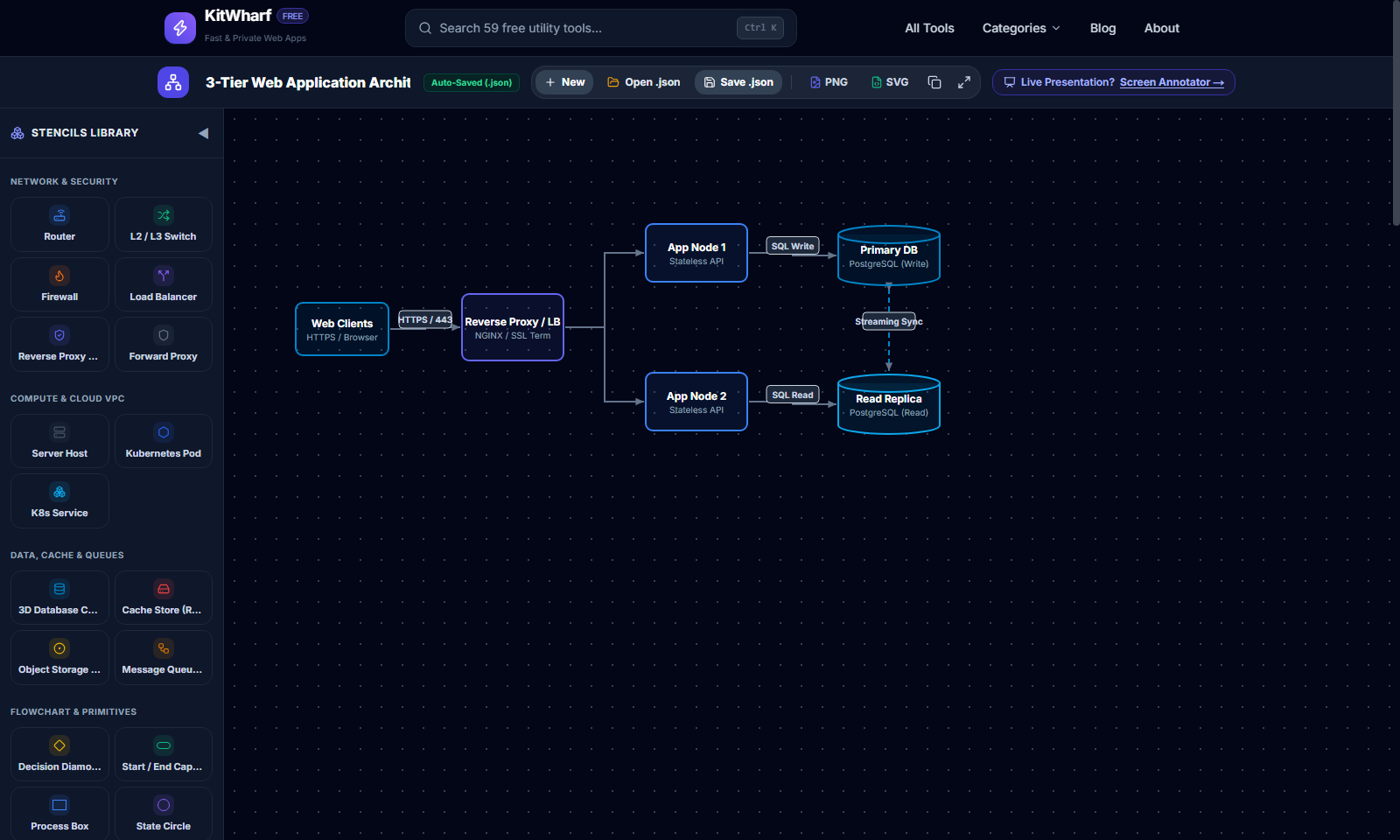
Whether you need to quickly map out a high-availability microservices cluster on dotted grid paper, document network topologies, or draft system design diagrams for technical interviews, DiagramCraft gives you the precision tools you need in seconds.
The 15 Vector Architecture Stencils
Unlike generic drawing tools that only offer raw rectangles, DiagramCraft provides a dedicated set of 15 specialized vector technical shapes tailored for cloud architects, network engineers, and systems developers:
   +------------------+       +------------------+       +------------------+
   |   [ROUTER (R)]   |       |   [SWITCH (S)]   |       |  [FIREWALL (FW)] |
   |  4-Way Routing   | ----> | Dual Packet Flow | ----> |  Mortar Barrier  |
   |   Cross Vectors  |       | Port Status LEDs |       |   Flame Shield   |
   +------------------+       +------------------+       +------------------+
            |                          |                          |
            v                          v                          v
   +------------------+       +------------------+       +------------------+
   | [LOAD BALANCER]  |       | [REVERSE PROXY]  |       |  [DATABASE (B)]  |
   |  1-to-3 Ingress  | ----> | Fortified Shield | ----> |  3D Depth Arc    |
   |  Balanced Split  |       |  Origin Fan-Out  |       | Isometric Volume |
   +------------------+       +------------------+       +------------------+
1. Network Routers
Model WAN ingress gateways, BGP border peers, and transit routing nodes. DiagramCraft's router stencil renders an authoritative circular node featuring 4-way cross routing directional vectors.
2. L2 / L3 Network Switches
Depict core distribution switches, top-of-rack data center switching fabrics, and VLAN access layers. Renders opposing packet transit vectors alongside dual ethernet port link status LEDs.
3. Enterprise Firewalls
Mark perimeter inspection barriers, DMZ enforcement zones, and stateful packet filters. Features a distinct brick-and-mortar structural pattern complemented by an amber flame emblem.
4. Load Balancers (L4 / L7)
Illustrate high-throughput ingress controllers (ALB, NLB, HAProxy, NGINX). Visualizes an incoming traffic stream splitting seamlessly across three balanced microservice destination branches.
5. Forward Proxies
Diagram outbound enterprise egress filtering, corporate content inspection gateways, and client anonymity layers with a directional traversal vector passing through a security inspection barrier.
6. Reverse Proxies & API Gateways
Represent edge ingress shields (Cloudflare, Kong, Envoy, Traefik). Features a fortified SSL/TLS security shield with an origin server fan-out matrix.
7. 3D Database Cylinders (B)
Model relational databases (PostgreSQL, MySQL), distributed NoSQL stores (Cassandra, DynamoDB), and primary-replica clusters with an authentic 3D isometric cylinder and depth curvature arc.
8. Server Compute Nodes
Sketch bare-metal rack hosts, Kubernetes worker nodes, virtual machines (EC2, Droplets), and container pods with hardware chassis bezels and dual LED activity lights.
9. Cloud VPC Containers
Define multi-Availability Zone perimeters, private subnet enclaves, and sovereign virtual private cloud perimeters with dashed container bounds.
10. Flowchart Decision Diamonds (D)
Map conditional evaluation forks, circuit breaker health checks, consensus algorithms (Raft/Paxos), and retry budget thresholds.
11. Start / End Capsules
Indicate pipeline triggers, user webhook arrivals, cron schedules, and end-of-lifecycle terminations.
12. Process Execution Boxes (R)
Standard rectangular computational blocks for microservice functions, REST endpoints, and background queue workers.
13. State & Queue Circles (C)
Circular nodes for Kafka topic partitions, RabbitMQ exchanges, finite state machine milestones, and pub/sub message brokers.
14. Single-Direction Connector Vectors (A)
Directional arrows for asynchronous event notifications, unidirectional pipelines, and HTTP REST request flows.
15. Bi-Directional Full-Duplex Vectors
Full-duplex connectors for WebSocket links, primary-replica database replication sync, and peer-to-peer gossip networks.
24px Snap to Grid & 15-Degree Angle Snapping
Nothing looks more amateur during an executive architecture review or engineering interview than crooked connector lines and haphazardly misaligned boxes.
DiagramCraft solves this with Precision Alignment Controls:
- 24px Snap to Grid (
G): Press G (or click the Magnet icon) to activate 24px coordinate quantization. Every stencil you drop, node you drag, and boundary box you resize snaps automatically to clean 24px grid intervals. - 15° Connector Angle Snapping: When drawing directional arrows (A), the vector automatically snaps to 15-degree angle increments (0°, 15°, 30°, 45°, 60°, 75°, 90°). This guarantees perfectly horizontal data pipelines, crisp vertical database connections, and standard 45° isometric diagonals.
- Math Dot Grid Backdrop (
W): Tap W to cycle between pure white paper, dark slate chalkboard, and mathematical dot grid paper. The dot grid provides a subtle visual rhythm that makes spacing services evenly effortless.
1-Click Production Starter Architectures
Need to draft an architecture in seconds? DiagramCraft features a 1-Click Starter Templates menu that instantly stamps production-tested design topologies directly onto your canvas:
Architecture Pattern 1: 3-Tier Scalable Web Application
   [Client App]
        |
        v
 [Reverse Proxy / LB]
   /      |       \
  v       v        v
[Web 1] [Web 2] [Web 3]
  \       |       /
   v      v      v
   [Primary SQL DB] <---> [Read Replica DB]
Instant topology with public clients hitting an SSL-terminating Reverse Proxy / Load Balancer, balancing traffic across an auto-scaling stateless web tier, communicating with a replicated relational database cluster.
Architecture Pattern 2: Zero-Trust Enterprise DMZ Ingress
[Public Internet] ---> [Next-Gen Firewall] ---> [Reverse Proxy / WAF]
                                                        |
                                                        v
                                                 [Core L2 Switch]
                                                  /            \
                                                 v              v
                                           [App Servers]   [Database Node]
Illustrates perimeter ingress security with an external firewall, edge WAF inspection, and an internal switching fabric isolating compute and persistence tiers.
Architecture Pattern 3: Decision & Workflow Logic
Complete branched flowchart showcasing conditional routing, pass/fail validations, and retry loops.
System Design Interview Playbook: How to Use DiagramCraft
If you are preparing for system design interviews at companies like Google, Meta, Amazon, or high-growth tech startups, practicing with DiagramCraft gives you an unfair advantage:
Phase 1: Set the Stage (Minute 0–2)
Open KitWharf DiagramCraft in your browser. Tap W to select the Math Dot Grid backdrop and tap G to activate Snap to Grid. Clarify functional and non-functional requirements (throughput, latency, availability, data consistency) using the in-place text tool (T) in the top corner of your canvas.
Phase 2: Ingress & Traffic Management (Minute 2–7)
Stamp a Reverse Proxy or Load Balancer node to represent your API Gateway. Use the Firewall stencil to mark DDoS mitigation and rate-limiting layers.
Phase 3: Stateless Application Tier (Minute 7–15)
Insert multiple Server Compute Nodes or Process Boxes. Show horizontal scaling across availability zones with the Cloud VPC container stencil. Connect ingress to compute using orthogonal arrows (A).
Phase 4: Persistence, Caching & Message Queues (Minute 15–25)
Stamp 3D Database Cylinders for your persistence layer. Add State Circles for Redis distributed caches or Kafka message queues. Use bi-directional vectors to illustrate replication and leader-follower sync.
Phase 5: Deep Dive & Bottleneck Highlighting (Minute 25–40)
When your interviewer asks "What happens when the primary database crashes?" or "Where is the single point of failure?", switch to the Fluorescent Chisel Highlighter (H). Highlight failover paths in luminous neon yellow without obscuring your node labels. Use the Laser Pointer (L) with its fading particle trail to guide the interviewer through the request lifecycle.
Phase 6: Save & Share (Minute 40–45)
Click the Download PNG button or copy the composite diagram directly to your clipboard to paste into the interview feedback doc or your personal revision notebook.
Architecture Whiteboard Comparison
| Feature / Criteria | KitWharf DiagramCraft | Lucidchart | Miro | Microsoft Visio |
|---|---|---|---|---|
| Account Required | No (Instant anonymous access) | Yes (Email + Password) | Yes (Mandatory signup) | Yes (Microsoft 365 ID) |
| Price | 100% Free Forever | Freemium ($7.95–$20/mo) | Freemium ($8–$16/mo) | $5–$15/mo per user |
| Board Limits on Free Tier | Unlimited | Limited to 3 editable docs | Limited to 3 editable boards | No free web tier |
| Technical Stencils | 15 Vector Shapes Built-In | Included | Included | Included |
| Precision 24px Grid Snapping | Yes + 15° Angle Snapping | Yes | Basic | Yes |
| Fluorescent Highlighter Engine | Single-pass 42% alpha (8 hues) | Standard marker | Standard marker | Standard marker |
| Data Privacy & Storage | 100% Client-Side RAM (Zero cloud storage) | Stored on third-party cloud | Stored on third-party cloud | Stored on OneDrive/SharePoint |
| Export Options | 1-Click High-Res PNG & Clipboard | Watermarked on free tier | Resolution limited on free | Requires export wizard |
Disclaimer: Lucidchart is a registered trademark of Lucid Software Inc. Miro is a registered trademark of RealtimeBoard, Inc. Microsoft Visio is a registered trademark of Microsoft Corporation. All third-party product names, logos, brands, and registered trademarks mentioned above are property of their respective owners and are referenced purely for factual identification and comparative review under nominative fair use. KitWharf is independent and is not affiliated with, sponsored by, or endorsed by any of these entities.
Zero-Trust Data Privacy: Enterprise-Safe by Design
In corporate environments, information security teams frequently audit software for compliance with SOC 2, ISO 27001, HIPAA, and GDPR. Uploading internal network diagrams containing real IP ranges, server hostnames, or database cluster topologies to public cloud whiteboard services can violate corporate data protection mandates.
KitWharf DiagramCraft solves this architectural privacy problem entirely:
- No Cloud Database: DiagramCraft does not store your canvas data, drawings, or vector coordinates on any remote server.
- In-Memory Execution: The entire SVG vector rendering and HTML5 Canvas drawing pipeline runs purely inside your browser tab's local RAM.
- Zero Tracking of Stencil Data: Your technical diagrams never leave your device. When you close the tab, the memory is purged cleanly.
Frequently Asked Questions
Can I use DiagramCraft to annotate live presentations or share screens on video calls?
DiagramCraft is purpose-built for sketching and exporting system design diagrams, flowcharts, and network architectures. If you need to mirror application windows, draw over live slides in PowerPoint, or annotate during Zoom meetings with freeze-frame support, use our companion tool: KitWharf ScreenInk Screen Annotator.
How do I export my diagram with a transparent background or white background?
DiagramCraft exports high-resolution composite PNG files. If you are drawing on the Math Dot Grid or Whiteboard backdrop, your exported PNG captures the crisp white or dark chalkboard background along with your vector nodes. You can also click "Copy to Clipboard" to immediately paste the diagram into Slack, Notion, Jira, or Confluence.
What are the hotkeys for the technical diagramming stencils?
Press D for Decision Diamonds, B for Database Cylinders, A for Vector Connector Arrows, R for Process Rectangles, C for State Circles, G for Snap to Grid, W to toggle Whiteboard backdrops, and V to return to standard pointer selection. You can also open the full 15-stencil palette modal at any time from the toolbar.
Start Diagramming Your Architecture Now
Skip the signup forms, paywalls, and corporate software approval queues.
Open the free KitWharf DiagramCraft Studio now and start whiteboarding your system design in seconds!